AI Storage for Model Training

AI model training requires storage that can handle two opposing I/O patterns simultaneously: billions of small random reads during data loading and terabyte-scale sequential writes during checkpointing. Purpose-built AI storage uses parallel file systems with NVMe-oF and GPUDirect Storage to keep GPUs fed at all times — eliminating the data pipeline bottleneck that causes enterprise GPU utilization to sit as low as 5%. If your GPUs are waiting on storage, you’re paying for compute you’re not using.
Here’s what storage needs to deliver for training to succeed — and why the architecture you choose determines whether your training runs finish on time or stall out waiting for data.
Why Training is a Storage Problem, Not Just a Compute Problem
The AI infrastructure conversation tends to start and end with GPUs. That’s understandable — accelerators are the most expensive line item in the data center. But the truth is: GPUs can only train as fast as storage can feed them.
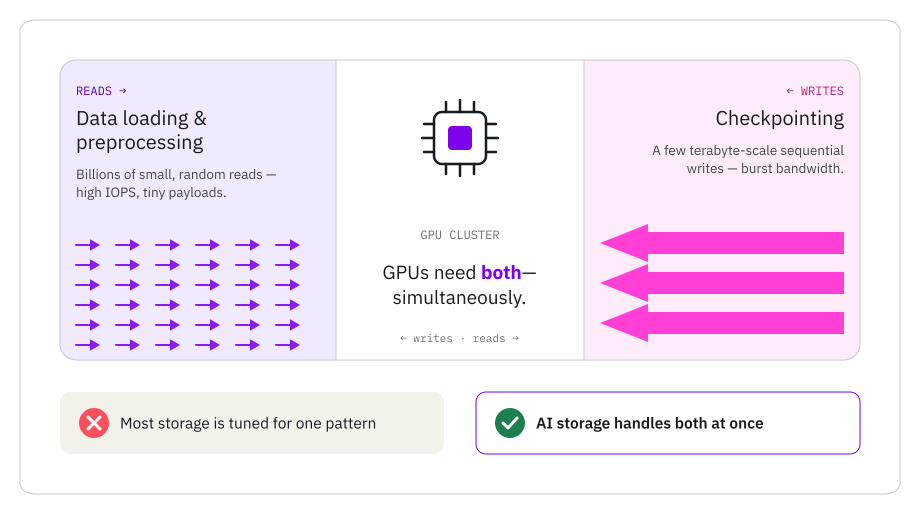
Figure 1: I/O Profile
AI training storage must handle two opposing I/O patterns simultaneously — small random reads during data loading and large sequential writes during checkpointing. Most legacy architectures are optimized for one; AI storage must deliver both without compromise.
A VentureBeat investigation found enterprise GPU utilization sitting as low as 5%. Gartner estimates AI infrastructure is adding $401 billion in new spending this year. Do the math: for every dollar spent on silicon, up to 95 cents is generating heat, not tokens.
The root cause isn’t the GPUs themselves. It’s the data pipeline underneath them. Training I/O is bipolar — it demands two completely different things from storage at the same time:
- Small random reads during data loading, preprocessing, and augmentation
- Large sequential writes during checkpointing
Most storage architectures are optimized for one of these patterns. AI training demands both, simultaneously, at scale. When storage can’t keep up, GPUs stall. And stalled GPUs are the most expensive idle asset in your data center.
The AI Training Data Pipeline — Where Bottlenecks Hide
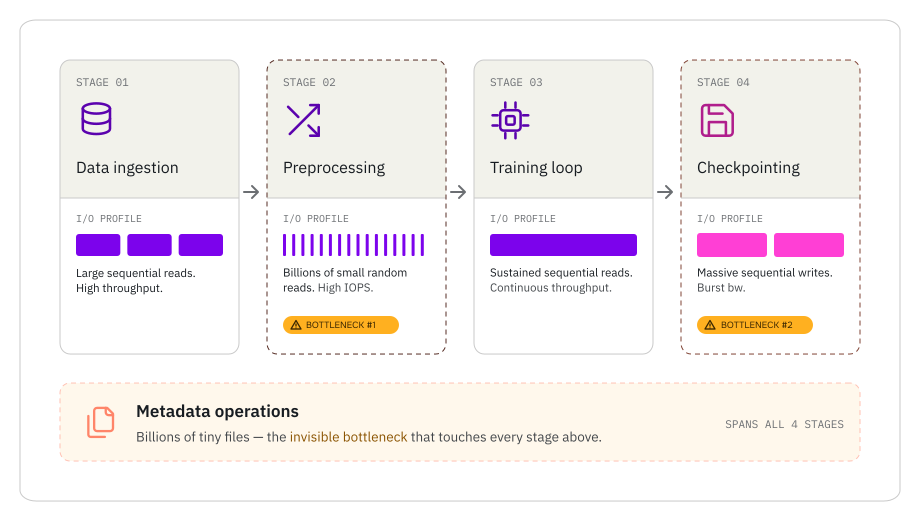
Figure 2: Data Pipeline
Each stage of the AI training pipeline places different demands on storage. Preprocessing and checkpointing are the two most common bottleneck points, while metadata operations create an invisible constraint across all four stages.
An AI training pipeline looks deceptively simple: load data, train the model, save progress. In practice, each stage puts radically different pressure on storage.
Stage 1: Data ingestion. Petabytes of raw data flow in from object storage, data lakes, or distributed repositories. This is the straightforward part — large sequential reads at high throughput.
Stage 2: Preprocessing. Here’s where storage takes a beating. Shuffling, tokenization, and augmentation generate billions of small random reads. Image training pipelines can demand 4 GBps per GPU in read performance for high-resolution datasets. If your storage can’t deliver random reads at this rate across hundreds or thousands of GPUs, the preprocessing stage becomes the first bottleneck in the pipeline.
Stage 3: The training loop. Batches stream to GPUs at sustained throughput. If storage can’t keep up, GPUs idle between iterations — the classic starvation pattern. Mixed-precision training (BF16) and techniques like FlashAttention have made the compute side faster, which only makes the storage gap more visible. The faster your GPUs process each batch, the faster they’re asking for the next one.
Stage 4: Checkpointing. The model’s full state is written to storage periodically. This is where the I/O pattern flips entirely — from reads to massive sequential writes. We’ll dig into this in the next section.
There’s a fifth, often invisible bottleneck: metadata. AI datasets routinely contain billions of files under 1 MB — text chunks, image tiles, tokenized sequences. Every file open, stat, and readdir operation hits the metadata server. Legacy storage with a centralized metadata “master node” creates a chokepoint that no amount of bandwidth can fix. As Omdia’s analysis of storage for AI training notes, the metadata layer is often the first thing to break at scale.
Checkpointing — The Hidden Storage Tax on Training
Checkpointing is how training runs survive hardware failures, preemptions, and scheduled maintenance. It saves the model’s complete state — weights, optimizer states, gradients, and learning rate schedules — so you can resume from where you left off instead of starting over.
The storage cost is staggering. A 70B-parameter model checkpoint runs roughly 140 GB in FP16. Add optimizer states (AdamW stores two additional copies of every parameter), and you’re looking at around 420 GB per save. Trillion-parameter models push checkpoint sizes into the terabytes — per save, across the cluster. Multiply by checkpoints every 30 minutes to two hours, and it’s easy to see how storage throughput becomes the constraint.
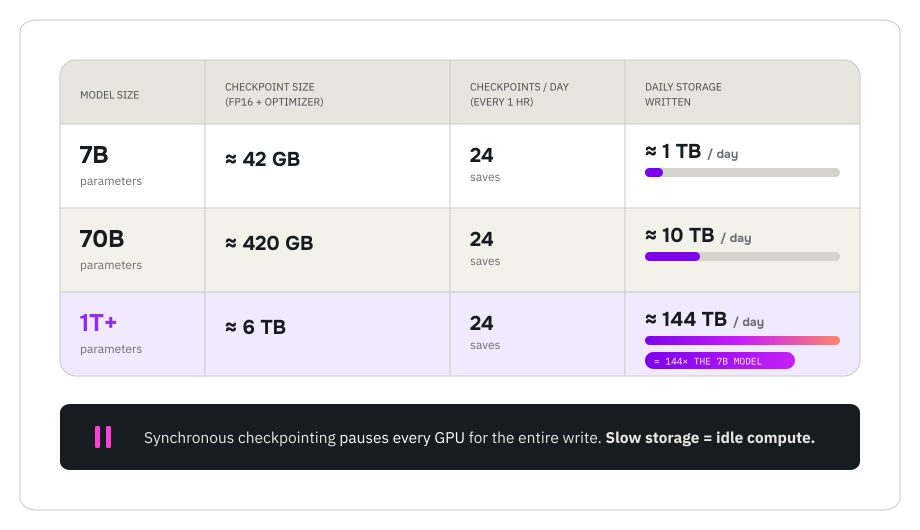
Figure 3:
Checkpoint MathCheckpoint storage math compounds quickly as models scale. A trillion-parameter model writing checkpoints every hour generates over 144 TB of writes per day — and every synchronous save pauses the entire GPU cluster.
The performance impact depends on your checkpointing strategy:
Synchronous checkpointing pauses all GPUs while the state writes to storage. A 1 TB checkpoint on slow storage means minutes of idle GPUs — multiplied by every save. AWS estimates that for large-scale ML training, checkpoint storage architecture can speed up overall throughput by
nearly 2x.
Asynchronous checkpointing writes in the background while training continues. It’s the better model, but it demands storage that can absorb burst writes without degrading the read throughput that’s feeding the training loop. Google Cloud demonstrated that multi-tier checkpointing (RAM → local NVMe → network storage) can dramatically reduce checkpoint latency.
The frequency trade-off is real: checkpoint too rarely and you risk losing hours of work to a hardware failure. Checkpoint too often and you burn GPU time on writes instead of training. The right storage architecture makes this trade-off disappear — WEKA demonstrated a 90% reduction in checkpoint time on Amazon SageMaker HyperPod, turning checkpointing from a performance tax into a background operation.
What Training Storage Architecture Actually Looks Like
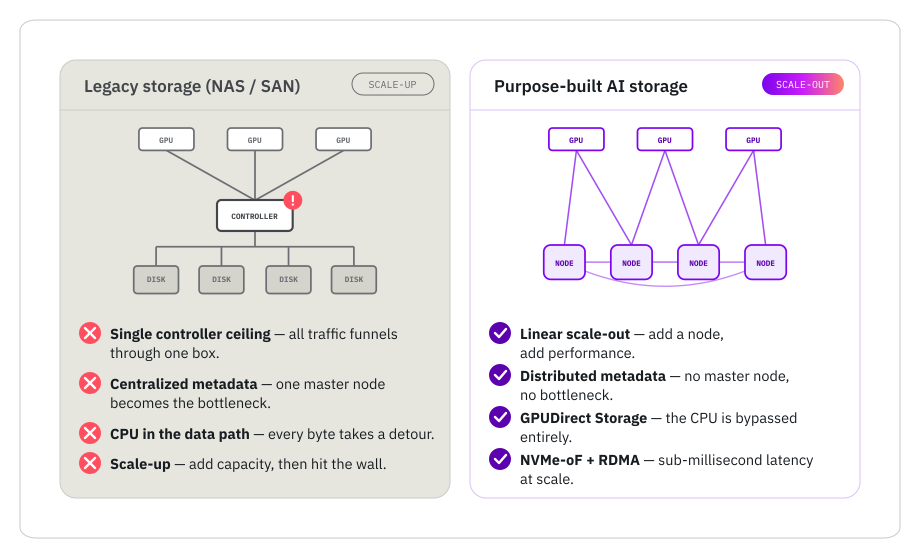
Figure 4:
ArchitectureLegacy NAS and SAN architectures funnel all I/O through a single controller, creating a ceiling that can’t be raised. Purpose-built AI storage distributes data and metadata across a mesh of nodes, scaling performance linearly as you add capacity.
If legacy storage can’t handle training I/O, what can? The answer isn’t a faster NAS or a bigger SAN. It’s a fundamentally different architecture designed for the I/O patterns that training demands.
- Parallel file system. Data is striped across a cluster of nodes. Unlike scale-up NAS (where you hit a controller ceiling), a parallel file system scales out — both capacity and performance grow linearly as you add nodes. This is how you feed thousands of GPUs simultaneously without creating a bottleneck.
- NVMe-native with NVMe-oF and RDMA. Purpose-built on flash from the ground up — not a legacy SAS/SATA architecture with an NVMe front end bolted on. NVMe over Fabrics delivers sub-millisecond latency from storage to compute. RDMA (Remote Direct Memory Access) bypasses the CPU entirely, eliminating a processing hop that adds latency at scale.
- GPUDirect Storage. NVIDIA’s GPUDirect Storage creates a zero-copy data path from NVMe storage directly to GPU memory. No CPU staging, no serialization overhead. Data moves from where it lives to where it’s needed in the fewest possible hops.
- Distributed metadata. No single “master node” bottleneck. Virtual metadata servers handle billions of small files with sub-millisecond lookup latency, scaling linearly with the rest of the system. This is what separates storage that works in benchmarks from storage that works with real AI datasets.
NeuralMesh™ was built around all of these principles — a unified, software-defined architecture designed specifically for the mixed I/O patterns of AI training and inference. If you’re curious about how it works under the hood, the NeuralMesh architecture white paper covers the engineering in detail.
Training and Inference on Shared Infrastructure
Here’s a trend worth watching: leading AI organizations are moving toward elastic clusters that pivot between training and inference on the same infrastructure. DeepSeek’s V3 architecture and Cohere both dynamically reallocate GPU resources between training and serving — rather than maintaining separate, dedicated clusters for each.
The economic logic is compelling. Dedicated training clusters sit idle during inference serving, and vice versa. In a world where DRAM prices have surged over 90% quarter-on-quarter, HBM is in acute shortage through at least H1 2027, and GPU availability is no longer guaranteed — you can’t afford to have expensive infrastructure sitting idle half the time.
This shared model places even greater demands on storage. Your storage layer has to handle training’s bipolar I/O (random reads plus sequential checkpoint writes) and inference’s latency-sensitive random reads — simultaneously, without performance degradation on either workload. That’s a significantly higher bar than either workload alone — and it’s exactly where a purpose-built, software-defined storage architecture starts paying compound dividends over the life of your infrastructure investment.
What to Look for in Training Storage
If you’re evaluating storage for an AI training cluster, here’s the short list:
- Can it handle both small random reads and large sequential writes simultaneously? Not sequentially. Not “optimized for mixed workloads” in the marketing sense. Simultaneously, at scale.
- Does performance scale linearly? Adding nodes should add proportional throughput. If there’s a master node or controller ceiling, you’ll hit it sooner than you think.
- Does it support GPUDirect Storage and RDMA? Zero-copy data paths from storage to GPU memory aren’t optional at GPU-cluster scale.
- Can it handle billions of small files without metadata bottlenecks? Test this with your actual dataset — synthetic benchmarks won’t expose metadata scaling limits.
- Does it work across on-prem, cloud, and hybrid? Your training runs shouldn’t be locked to one deployment model.
The Buyer’s Guide to AI Storage covers the full evaluation framework, including scoring criteria and the questions your storage vendor probably hopes you don’t ask.
Frequently Asked Questions About AI Training Storage
What storage is best for AI model training?
Purpose-built AI storage uses a parallel file system architecture with NVMe-oF, GPUDirect Storage, and distributed metadata. This combination delivers the simultaneous random read throughput (for data loading) and sequential write bandwidth (for checkpointing) that AI training demands — something traditional NAS, SAN, and object storage architectures weren’t designed for.
How does checkpointing affect AI training performance?
Checkpointing saves the model’s complete state to storage periodically. For large models, each checkpoint can run into hundreds of gigabytes. Synchronous checkpointing pauses all GPUs during the write. The storage architecture determines whether checkpointing is a performance tax (minutes of idle GPUs per save) or a background operation that doesn’t interrupt training.
Why do GPUs sit idle during AI training?
GPUs can only process data as fast as storage can deliver it. When storage throughput falls short — during data loading, preprocessing, or checkpoint writes — GPUs stall waiting for data. This is called GPU starvation, and it’s the primary reason enterprise GPU utilization can fall as low as 5%.
What is the difference between synchronous and asynchronous checkpointing?
Synchronous checkpointing pauses training while the full model state writes to storage. Asynchronous checkpointing writes in the background while training continues, but requires storage that can absorb large burst writes without impacting the concurrent read workload feeding the training loop.
Can the same storage handle both AI training and inference?
Yes — and increasingly, that’s the goal. Leading AI organizations run training and inference on shared, elastic infrastructure. This requires storage that handles training’s mixed I/O patterns and inference’s latency-sensitive random reads simultaneously, without performance degradation on either workload.
Related Assets
-
The Buyer’s Guide to Modern Storage for Healthcare and Life Sciences Organizations

The Buyer’s Guide to Modern Storage for Healthcare and Life Sciences Organizations
-
The NAND Flash Shortage Survival Guide

The NAND Flash Shortage Survival Guide
-
Practical Strategies for Navigating the Memory Shortage

Practical Strategies for Navigating the Memory Shortage